મંગળવાર, 21 ઑક્ટોબર, 2014

Wallpaper 6233 Nokia


શનિવાર, 9 નવેમ્બર, 2013

Nokia 1202 light solution

Nokia 1202 light solution

This is Nokia 1202 light problems solution.Many time may be damage nokia 1202 lcd and keypad light.when damage light part then no light on the phone.lcd light and keypad light connected with series line so problem  any line then no light.


How to do this work : first check light positive volt on the capacitor.if you see no voltage on the capacitor then check light ic and coil.damage any parts replace that parts.If 10v or more voltage have on the capacitor but problem then check light ways.

Nokia 1202 light jumper

Nokia 1202 light jumper

This is the solution of Nokia 1202 light problem.New I showing How to repair Nokia 1202 light problem Without parts.Only making jumper.please view the below picture and note.You can repair nokia 1202 light without ic.


How to do this work : If you have not available light ic, then you can use this solution. If you want to repair nokia 1202 light problem making jumper,you can do this.First remove coil, one led and light ic after that make pink and red color jumper.

Nokia 1202 mic solution

Nokia 1202 mic solution

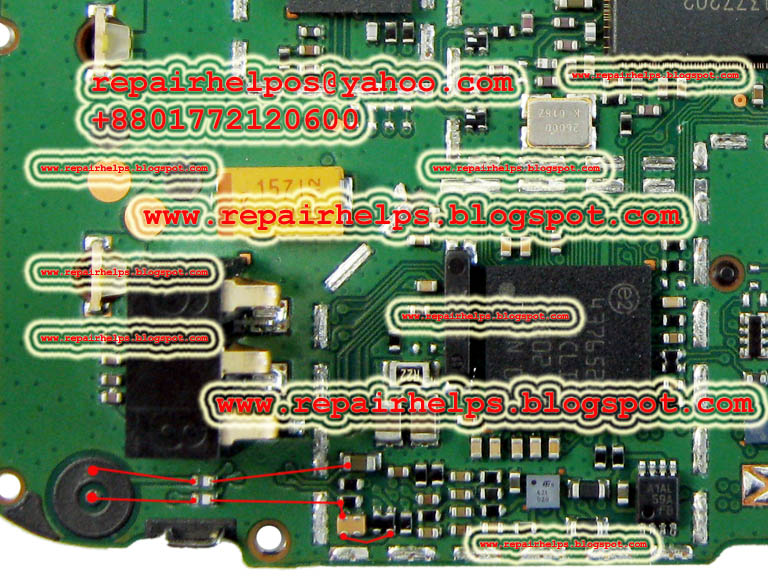
This is nokia 1202 mic solution.May be damage on mic nokia 1202 phone.When damage mic part then may be poor mic sound ,bad mic sound or no sound.If you repair this problem following to the below picture.


How to do this work : Look at the picture this is mic ways.if you face mic problem of nokia 12002 phone.Replace mic at first and check.if problem still then check this ways.

Nokia 1202 test mode

Nokia 1202 test mode

Test mode is one of the problem of nokia 1202 phone.Maximum time this problem may be water damage.But it repair very simple.Any repairer csn be repair this problem very simple.Now showing how to repair it.


How to do this work : Step one wash full pcb goodly and hit with stan light at 10 Minuit after that open your phone and see result. If problem still then remove red mark parts.

Nokia 1202 ringer solution

Nokia 1202 ringer problem solution is very simple.Now I share how to repair nokia 1202 ringer problem.I apply this solution many. time in many phone.So it is very useful post, view the below picture and red how to do this work.


How to do this work : If not work nokia 1202 ringer.Then check profile on the phone if silent mode then active general mode after that check your ringer.If you see ringer not work then open your phone and check ringer speaker.If damage is speaker  then replace speaker.If speaker ok but problem still then check ringer ways and ringer ic.

Nokia 1202 Insert sim

Nokia 1202 Insert sim solution

One day a mobile phone repairer call me for nokia 1202 phones insert sim problem.He said there are All solution of nokia 1202.But 1202 insert sim solution is not found.then I check this site  And I saw really there are not found Nokia 1202 insert sim solution.He request me for nokia 1202 insert sim solution.Then I post this solution.


1st solution
How to do this work : It's repair very easy, If your phone has this problem then first check sim line ways if you see anything wrong then repair that flout.If you see they are ok but problem still then re-hot or replace sim ic. If the solution is not complete then just make this jumper.If 1st solution is not work then you can try 2nd solution.I hope your problem will be solved.
2nd solution 


 How to this work : If first solution is not work then check red mark capacitor If you see capacitor is short, then just replace this capacitor.

Nokia 1202 ear speaker problem solution

Nokia 1202 ear speaker problem solution

Ear speaker is important for every cell phone when damage ear speaker then ear speaker is not work or low sound or bad noise. Now I post here nokia 1202 ear speaker solution


How to do this work : This red mark ic is one kind of switching ic.This ic just connect with ear speaker and loud speaker.When phone calling with normal mode sound then work ear only speaker when you active loud mode then working loud speaker.So when ear speaker not work then replace this ic.

Nokia 1280 lcd display line ways

Nokia 1280 lcd display line ways

Now  I will Discuss about Nokia 12080 lcd display problem and how to repair it.You need to know your phone has display problem or other problem.How to understand display problem or other problem its very simple Just check info with HWKand see result.If you see LCD:unknown then you can confirm that is lcd problem or lcd line damage.It needs to know when this phone has display problem then phone will not on no call no light.

How to do this :  Check all lcd line if you found damage any line then repair that line.Then solder display and see result thank you.

Nokia 1280 local mode solution

Nokia 1280 local mode solution

Some Nokia 1280 phone has local mode problem.When you put battery in your phone, then show local mode on your phone screen some time When you on your phone, then show local mode on your phone screen.Now I share how to repair it.


How to do this : If your phone has this problem then first clean full pcb and see result.If problem still then remove red mark parts.I hope your problem will solve

Nokia 1280 call failed solution

Nokia 1280 call failed solution

Call failed is one kind of network problem.Showing full network but call not work.When you call to other phone then showing call failed.Now I share how to repair nokia 1280 1616 1800 call failed problem.


How to do this solution : Check your phone other sim if problem still then re-hot or re-ball or replace.When you re-hot or re-ball this parts then very carefully hit on this parts.

Nokia 1280 auto charging

Nokia 1280 auto charging

Nokia 1280 auto charging problem this means showing charge with out charger.This is one kind of charging problem.This is very critical  problem.Today I showing how to solve It.This problem maximum time has for damage charging part's parts.


How to do this : When showing auto charging on your phone then first clean full pcb goodly next  hit with stan light if problem still then change red mark parts.

Nokia 1661 torch light solution

Nokia 1661 torch light solution

Torch light is the most important thing for every man.It is very useful for night time.Now I share how to repair Nokia 1661 torch light.first view the below picture.


How to do this work: At first check led If you see led is damage then replace led.If you see led ok but problem still then check Led ways if you  see damage ways then make this jumper following this picture.

Nokia 1661 charging solution

Nokia 1661 charging solution

Charging is the most important of mobile phone.Impossible use mobile phone without charging.Now I share how to repair Nokia 1661 charging problem.This problem repair is very simple.Following to the few simple step.


How to do this work : If you facing this problem then first check your charger next check charging port.if they are ok but problem still then check red mark parts.

Nokia 1661 hedphone solution

Nokia 1661 hedphone solution

This is the solution of nokia 1661 headphone logo solution.Phone is not connected with headphone but showing headphone logo on the mobile screen.It's repair  very simple ways.view the below picture and work.

How to do this work : First clean full pcb goodly especially clean headphone connector and hit with stan light.then see result.If problem still then remove red mark parts.

Nokia 1661 light jumper

Nokia 1661 light jumper

Nokia 1661 display light problems solution without light ic and coil it is tested solution.If you face this problem you can use this solution..There are two solution of here.You can use any one solution This tow solution are tested.
                                        

Solution 1


Solution 2
How to do this work : Solution 1: Remove red mark 4 parts one led coil,light ic and transistore then make jumper following picture.
Solution 2 : Remove red mark 3 parts led,coil and light ic then make this jumper.

Nokia 1661 insert sim

Nokia 1661 insert sim

Although, Nokia 1661 insert sim is very simple problem But still i post this solution.I hope Many people will benefit of this solution.


How to do this work : Nokia 1661 insert sim repair is very simple.If any body face this problem then first check sim card check battery next check sim line ways If you see tey are ok but problem still then rehot or replace sim ic and see result if same result then make this jumper.

Nokia 1661 mic solution

Nokia 1661 mic solution

Mic is the part of voice input aria of any mobile phone.Mic is main component of voice input.So it is very important for every phone.When damage mic then no voice input or low voice input in the phone.Now I share how to repair nokia 1661 mic problem. 


How to do this work : If your phone has this problem first change mic then check your phone. If problem still then check this line if damage any line make that line using this picture.

Nokia 1661 power button ways

Nokia 1661 power button ways

One day a mobile phone came to me. It was Nokia 1661.When I press power button of that phone there are no response.But When I connect a charger with the phone then charging is ok.Then I understand power button is fail.After that I make this solution.


How to dot his work : Open the keypad sticker check power button if you see power button damage then make this jumper.power button out side is gnd and inside is power button main line.

Nokia 1661 fake charging

Nokia 1661 fake charging

May be many problems of your phone.But maximum problems are repairable, so no tension.Today I shown how to repair nokia 1661 fake charge.This solution tested many time.


How to do this work :If your phone is charging ok but charge not save.then rehot this parts or replace.If you this work your problems will be solved.

Nokia 1800 not charging solution

Nokia 1800 not charging solution

Description of problems : When you connect charger in your phone then give a massage on your phone "Not Charging".When displaying this massage on your phone then It is not  charge.This problem may be many reasons.
1.If you put other phone battery in your phone.
2.Charge with Bad or invalid charger.
3.charge with low voltage.
4.And hardware problem.


How to do this work : First check battery and check charger.If they are ok but problem still then open your phone and check charging port and next check diode and charging line if they are ok but problem same.Then check yellow line and resistor. If damage resistor change it.

Twitter Delicious Facebook Digg Stumbleupon Favorites More

 
Design by Free WordPress Themes | Bloggerized by Lasantha - Premium Blogger Themes | belt buckles